What is foveated rendering, and how much does it save?
Foveated rendering shades the edge of each eye's view at a lower rate than the centre. Why that works, fixed against eye-tracked, and what it saves.
By EncidXVII, . Last updated .
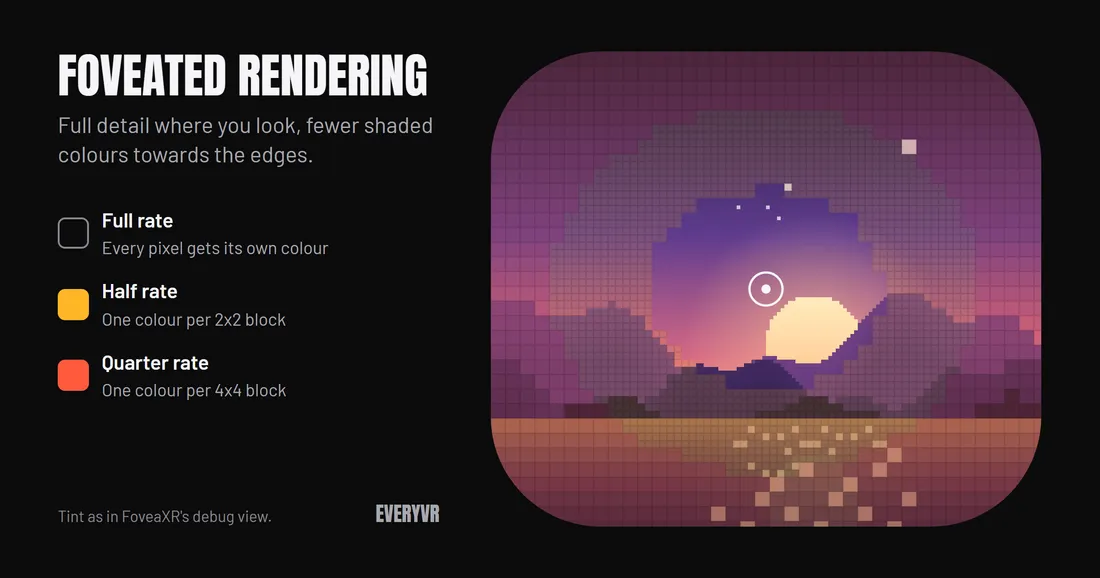
Foveated rendering is a way to make a VR game cheaper to draw: the middle of each eye’s image is shaded at full detail and the edges at a lower rate. It works because your eye only sees sharply in a small area around where it looks. FoveaXR adds it to SteamVR and OpenXR games that do not have it.
Why it works
The sharp part of your vision comes from the fovea, a small pit in the centre of the retina packed with cone cells (Wikipedia: Fovea centralis). Away from it, visual acuity falls off. Graphics researchers have used that falloff to speed up rendering for years: a 2012 Microsoft Research paper, Foveated 3D Graphics, reported graphics running 5 to 6 times faster on a desktop HD display by drawing the periphery at lower detail.
How it saves time
A game decides the colour of every pixel it draws. With foveated rendering, one shaded colour covers a 2x2 or 4x4 block of pixels near the edge of the view, so the GPU decides far fewer colours per frame. The outlines of objects stay as sharp as before; only the shading gets coarser.
On PC, the GPU feature behind this is called variable rate shading. In Direct3D 12 it is part of the API, and from Tier 2 a program can set the shading rate across the screen with an image. FoveaXR uses that image to set the sharp middle and the coarse rings.
Fixed and eye-tracked
There are two kinds, and the difference is where the sharp zone sits (Wikipedia: Foveated rendering).
| What | Fixed | Eye-tracked |
|---|---|---|
| Where the sharp zone is | The middle of the lens, always | Where you are looking |
| Needs | Any headset | A headset that shares eye tracking with PC games |
| In FoveaXR 0.2.0 | Tested on Windows | Experimental |
For eye-tracked foveation, the headset has to pass the eye data on to the game. In OpenXR games that happens through
the XR_EXT_eye_gaze_interaction
extension. FoveaXR’s eye-tracking guide explains how to check whether yours does.
What it costs in image quality
Foveated rendering is not free in image quality. With FoveaXR:
- On the Low and Medium presets, most people do not notice it.
- On High, or with a wide field of view, the outer ring can look softer.
- Games that use temporal anti-aliasing can shimmer at the edges of the rings.
FoveaXR has a debug tint that colours the coarse rings (yellow for half rate, red for quarter rate), so you can see where they are and judge for yourself.
How much it saves
It depends on how much of a game’s frame is pixel shading. Foveated rendering only reduces shading, so a game whose frame time goes mostly elsewhere gains less.
FoveaXR’s own figures, from its README:
| Where | Without | With FoveaXR |
|---|---|---|
| Test scene, eye passes (pixel-heavy), High preset | 1.37 ms | 0.25 ms |
| Tower Unite (Unreal Engine 4, Direct3D 11), eye passes | 2.93 ms | 2.28 ms (22% less) |
Real games save less than the test scene, which was made to be heavy on pixel shading. Both were measured on an RTX 5070 Ti.
Do not take anyone’s number for your own game, including these. In VR, press Ctrl+F9 to switch FoveaXR off and on; the app then shows the GPU time your game saves on your hardware.
When it does nothing
Foveated rendering needs a GPU and graphics API with variable rate shading. With FoveaXR that means Direct3D 12 on NVIDIA RTX 20, AMD RX 6000 or Intel Arc cards and newer, or Direct3D 11 on NVIDIA RTX 20 and newer. Vulkan and OpenGL games are not supported yet. Some games save nothing because FoveaXR cannot find their eye images, and games with anti-cheat are left alone. The supported hardware guide has the full list.
Sources
- Fovea and visual acuity: Wikipedia, Fovea centralis
- Using the acuity falloff in graphics: Guenter, Finch, Drucker, Tan and Snyder, Foveated 3D Graphics, ACM SIGGRAPH Asia 2012
- Variable rate shading in Direct3D 12: Microsoft Learn
- Fixed and eye-tracked foveated rendering: Wikipedia, Foveated rendering
- OpenXR eye gaze: Khronos registry, XR_EXT_eye_gaze_interaction
- FoveaXR’s measurements: the FoveaXR README