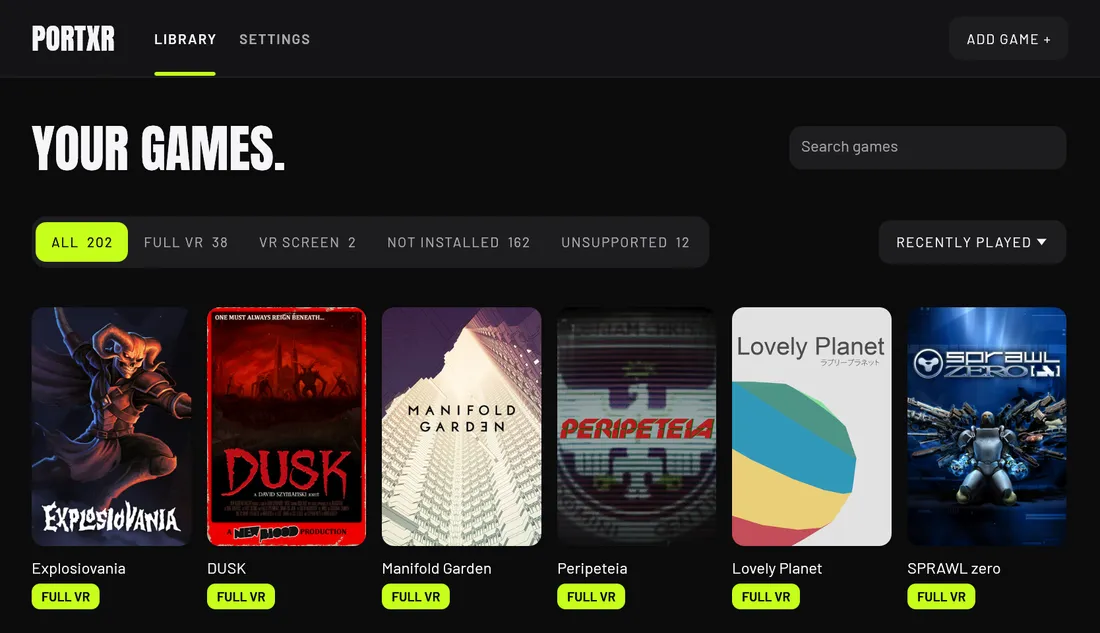
What PortXR does
- A stereo 6DOF view at real scale, with smooth or snap turning, a comfort vignette and recenter.
- Motion controllers act as keyboard and mouse or as an Xbox pad, and every button can be rebound.
- Aim with your head or your hand. The game's gun moves into your hand.
- Three ways to play: full VR, the game in 3D on a big screen, or flat on a VR cinema screen.
- Remove VR puts the game folder back byte for byte. Games with anti-cheat are refused.
Games
What each game needs to play well with PortXR: whether it works, the headsets it was tested on, and the script that fixes it.
No game scripts yet
PortXR needs no entry to run a game: it tells you per game whether it can. Entries are for the games that need a script or settings to play well. Play one for 10 to 15 minutes and yours can be the first.
How it works
PortXR adds VR to a game by putting a few files into the game’s own folder. The game loads them when it starts. From then on the game’s camera is drawn twice, once for each eye, and the two pictures go to your headset through OpenXR. Your controllers reach the game as a keyboard and mouse or as an Xbox pad, so the game itself needs no VR support.
What goes into the folder depends on the engine:
- Unity: BepInEx, a mod loader, and the PortXR plugin.
- Godot 4.3 and newer: a
PortXRfolder and anoverride.cfgbeside the game’s exe. - Unreal Engine 4.22 to 5.6: a
dwmapi.dllbeside the game’s Shipping exe inBinaries\Win64. The engine then renders both eyes itself.
PortXR writes every file it adds into a receipt, .vrinstall.json. Remove VR reads it and puts the folder back
byte for byte. Your settings and game scripts live in %APPDATA%\PortXR, outside the game folder.
The desktop app finds your games on Steam, Epic and GOG, or in a folder you add. It marks each one Full VR, VR screen or the reason it cannot run, before anything is installed.
Three ways to play
Switch between them in the VR menu: double-tap the left menu button, or press F11.
| Mode | What you see | Pick it when |
|---|---|---|
| Full VR | You stand in the game at real scale, in 6DOF stereo, and aim with your head or right hand | First-person games, and any game you want to be inside |
| 3D screen | The game in 3D inside a big screen, as on a 3D monitor. The game’s camera steers, not your head | Third-person games, and 2D games drawn by a perspective camera |
| VR screen | The flat game on a big screen 3 m away: curved on Virtual Desktop and Meta’s runtime, flat on SteamVR | Full VR shows something wrong, or the game only gets this mode |
What each engine gets:
| Engine | What you get | Notes |
|---|---|---|
| Unity 2018.4 to Unity 6, Mono and IL2CPP | Full VR, 3D screen, VR screen | Built-in, URP and HDRP; post-processing reaches the eyes |
| Unreal Engine 4.22 to 5.6 | Full VR, 3D screen, VR screen | From 4.25 also the camera picker, Hide objects, scripts |
| Godot 4.3 and newer | Full VR, 3D screen, VR screen | Runs the game on Direct3D 12 |
| Godot 4.0 to 4.2, builds without Direct3D 12 | Full VR from the engine’s own OpenXR | No laser pointer or VR menu |
| Older Unreal Engine, Godot 3 | VR screen only | Windows only; nothing is added to the game folder |
The supported games guide has the detail per engine.
The facts
| Works with | Unity 2018.4 to Unity 6, Unreal Engine 4.22 to 5.6 and Godot 4 games on Direct3D 11 or 12, with any OpenXR headset |
|---|---|
| Runs on | Windows, Linux through Proton (experimental) |
| Version | 0.2.0 (early access), changelog |
| Price | Free, with no account, telemetry or paid tier |
| Licence | Open source, GPL-3.0-only |
| Source | github.com/EncidXVII/PortXR , 0 stars |
| Made by | EncidXVII, on GitHub, Threads and X |
What it does not do
- Online play. Games with EasyAntiCheat or BattlEye are refused on purpose, and multiplayer-only games are flagged. PortXR is for single-player games.
- Vulkan, OpenGL and 32-bit games. Vulkan and OpenGL are not built yet. 32-bit games cannot work, because no OpenXR runtime supports them.
- Quest standalone. PortXR runs on the PC. A Quest works as a PC VR headset through a link.
- A long list of tested games. Unreal Engine support was tried with Unreal Engine 4.26, 4.27, 5.0, 5.4 and 5.5 games and requires more testing. Linux support is experimental.
- Signed builds. Windows warns about an unknown publisher on first run, and some antivirus tools flag the mod
loader’s
winhttp.dllin game folders. Every release has a SHA-256 checksum.
PortXR has no account and no telemetry. The app asks GitHub for the newest release (it shows a link and never updates itself), and downloads two public lists whole: Wikidata’s list of Unity, Unreal and Godot games, and a community list of games with anti-cheat. Your library is not sent anywhere.
Getting started
- Download PortXR, unpack it anywhere and keep the folder together.
- Start your headset’s runtime (SteamVR, Virtual Desktop, Quest Link, WiVRn or Monado), then run
PortXR.exe. - Pick a game and press Play in VR. PortXR adds itself to the game folder and starts the game.
The first time VR starts in a game, a short card walks you through recenter, world scale and the controls. The install guide has the Linux steps, and the troubleshooting guide covers a game that starts flat.
Guides
- Install PortXR and play a game in VR What you need, the three steps from download to playing a flat game in VR, and the extra step on Linux.
- Uninstall PortXR Take VR out of one game or out of all of them, and remove PortXR's settings.
- Which games PortXR can put in VR, and which it refuses PortXR plays 64-bit Unity, Unreal Engine 4.22 to 5.6 and Godot 4 games on Direct3D 11 or 12. What each engine gets, and what is refused and why.
- Fix a game that starts flat or looks wrong in PortXR One section per problem: the game starts flat, is not listed, ignores the controllers, has something in the view or a black UI panel.
- Godot games in VR: what works on 4.3, 4.0 to 4.2 and Godot 3 PortXR gives Godot 4.3 and newer games full VR on Direct3D 12, uses the engine's own OpenXR on 4.0 to 4.2, and puts Godot 3 games on a VR screen.
- How to play flat PC games in VR What it takes to play a non-VR Unity, Unreal Engine or Godot game in a headset, which games work, what does not, and the three steps with PortXR.
- How to tell which engine a game uses Three checks in a game folder tell Unity, Unreal Engine and Godot apart, and Mono from IL2CPP. A table of the telltale files for each engine.
Questions about PortXR
Can I play my game in VR with PortXR?
Most likely, if it is a 64-bit Windows game made with Unity, Unreal Engine or Godot, uses Direct3D 11 or 12 and has no anti-cheat. The app tells you per game before anything is installed. The supported games guide lists what works and what is refused.
Does PortXR work with Unity IL2CPP games, or only Mono?
Both. Unity games from 2018.4 to Unity 6 work with either scripting backend: Mono games get BepInEx 5 and IL2CPP games BepInEx 6, each with the PortXR plugin. The exception is a Mono game built with Unity's code trimming, which is rare: the mod loader cannot start in it, so PortXR marks it as not supported.
Do I get motion controls, or only head tracking?
Motion controls. The controllers act as a keyboard and mouse or as an Xbox pad, and every button except the sticks can be rebound. You can aim with your head or with your right hand, and Weapon in hand moves a first-person game's gun into your hand.
Does PortXR change my game files, and how do I undo it?
It adds its files to the game folder and records every one of them in a receipt. Remove VR on the game's page puts the folder back byte for byte, and nothing else on your PC changes. Steam's file check leaves PortXR's files in place, so Remove VR is the way to take them out.
Can I get banned for using PortXR?
PortXR refuses games with EasyAntiCheat or BattlEye and flags multiplayer-only games. Modding an online game can break its terms of service and get an account banned, so use PortXR for single-player games only.
Does PortXR work with Meta Quest 2, Quest 3 and Quest Pro?
Yes, as a PC VR headset through Quest Link, Air Link, Virtual Desktop or Steam Link. PortXR runs on the PC; the Quest's standalone mode is not supported.
Does PortXR work on Linux?
Yes, through Steam's Proton, for Unity, Unreal Engine and Godot 4.3 and newer games. Each game needs launch options in Steam, which the game's page in PortXR lets you copy. Linux support is experimental and requires more testing.
My game starts flat. What now?
Start your VR runtime first (SteamVR, Virtual Desktop or Quest Link) and put the headset on, then press Play in VR. The game's page names the runtime PortXR will use and says what to check. If it is still flat, press Export logs and open an issue with the zip.
More tools from EveryVR
-
WristXR
VR desktop overlay with wrist clock
0.1.0, early access. Windows, Linux (experimental).
-
FoveaXR
Foveated rendering for any PC VR game
1.0.0, released. Windows, Linux with Proton (experimental).
-
SweatXR
VR fitness and calorie tracker
1.0.0, released. Windows, Linux (experimental), Steam Frame (experimental).