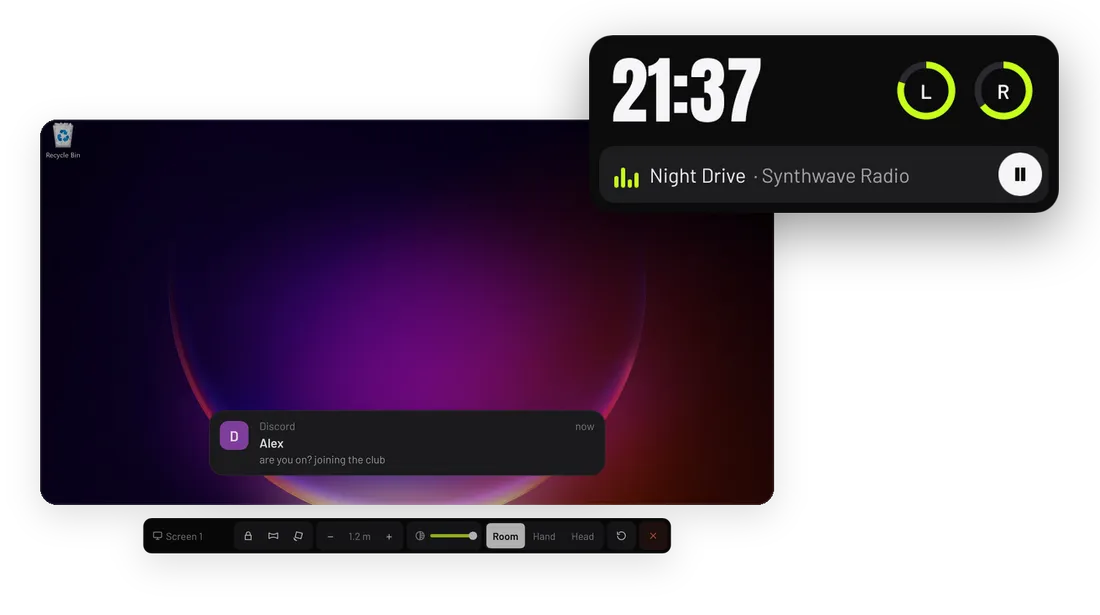
What WristXR does
- Every monitor as its own panel, flat or curved, at any size and distance. Any window can be its own panel too.
- A two-hand keyboard in your own layout, with a mode that types straight into the VRChat chatbox.
- A wrist watch for the time, controller batteries, music and Discord messages, in seven layouts.
- Double-tap one button to hide everything. Hidden panels stop capturing, so they cost nothing.
- Under 0.1 ms of GPU time per frame, and it shows its own cost live.
How it works
WristXR is a SteamVR overlay: a separate program whose panels SteamVR draws over whatever game is running. It captures your monitors and windows and shows each one as a panel in VR. It does not change any game and needs no per-game setup.
Your controllers point and click on the panels. A hand on a panel takes from the game only the controls that do something there, and only once you let them go, so the other hand keeps playing.
Screens, keyboard and watch
Screens and windows. Mixed-DPI and multi-monitor setups map exactly. Point at a panel and a toolbar appears under it: lock, curve, free angle, size, opacity, Room, Hand or Head, reset and close. The screens and windows guide has every control.
Keyboard. It types in your Windows layout, with sticky Shift, Ctrl and Alt, a language key and typing sounds. Chat mode sends what you type straight to the VRChat chatbox over OSC. See the keyboard guide.
Watch. It sits on the back of your wrist and shows only while you look at it: the time, the date, battery rings for both controllers and one line for the song playing, a new message or a low battery. Point at the time to open it for the music player, Windows volume, quick switches, Add, the Inbox, the menu, and the frame rate, load and WristXR’s own cost. Seven layouts set what the glance shows.
Measured with an RTX 5070 Ti, Windows 11 and SteamVR, on a desktop that changes all the time (the worst case), captured at 60 fps:
| Budget | Target | Measured |
|---|---|---|
| GPU per VR frame (WristXR only) | Under 0.3 ms | 0.01 to 0.1 ms |
| CPU, one core | Under 3% | 0.6% to 2.8% |
| RAM | Under 150 MB | 64 MB to 78 MB |
Setup and the open watch show the same numbers live for your own PC.
The facts
What it does not do
- Everything on Linux. The Linux build (X11 and Wayland) is experimental. Not on Linux: the screen detail pass, key click sounds, switching the keyboard language from VR, and the GPU load on NVIDIA.
- Other languages. WristXR is in English.
- Share the controllers with another overlay. Run one overlay at a time: two fight over the same controller input and notification port.
- Signed builds. Windows SmartScreen warns on first run. Every release has a SHA-256 checksum.
WristXR has no account and no telemetry. Its network use is a GitHub release check, VRChat OSC on your own PC and a notification port on your own PC.
Getting started
- Have SteamVR installed.
- Download WristXR, unzip it and run
WristXR.exe. There is no installer. - Put on your headset and follow the first run: hand, main screen, keyboard test, tips.
From then on it starts with SteamVR. The install guide has the Linux steps.
Guides
- Install WristXR From download to your desktop on a panel in SteamVR, on Windows and on Linux.
- Uninstall WristXR Take WristXR off SteamVR's list and delete its settings.
- See and use your desktop in VR with WristXR Add a screen or one window as a panel, move, resize, curve and lock it, put it on your hand, and click, scroll and drag with the laser.
- Type in VR and into the VRChat chatbox with WristXR The two-hand keyboard, sticky Shift, Ctrl and Alt, the language key, and Chat mode, which sends what you type to the VRChat chatbox over OSC.
Questions about WristXR
Does WristXR work with VRChat?
Yes. It runs beside VRChat and types into the chatbox over OSC once OSC is switched on in VRChat. It takes from the game only the controls you are using on a panel.
Does WristXR slow down my game?
It is built not to: under 0.1 ms of GPU time per frame and a few percent of one CPU core on an RTX 5070 Ti. Hidden panels stop capturing entirely, and the menu shows the real cost on your machine.
Does WristXR work on Linux and Wayland?
Yes, on X11 and Wayland with SteamVR for Linux. On Wayland the first run asks once which screens and windows to share, and windows show without their titles. Linux support is experimental and requires more testing.
Does WristXR work with a Quest over a wireless link?
Yes. WristXR runs in SteamVR on the PC, so a Meta Quest 2, 3 or Pro works through Air Link, Virtual Desktop or Steam Link, as well as a Link cable.
Can I show one window instead of the whole screen?
Yes. Pick it from Menu, Add window, or grip a screen and pull the window under the pointer out of it. The window becomes its own panel that you can move, resize, curve or put on your hand. On Wayland a window cannot be pulled out of a screen; share it from the window list instead.
Can I read messages in VR?
Yes, on Windows. Discord messages, or Windows notifications from any app if you choose, show as a banner low in your view and on the watch, with a buzz. The last few wait in the Inbox. They are read on your PC only and never stored on disk or sent anywhere.
More tools from EveryVR
-
PortXR
Play flat PC games in VR
0.2.0, early access. Windows, Linux through Proton (experimental).
-
FoveaXR
Foveated rendering for any PC VR game
1.0.0, released. Windows, Linux with Proton (experimental).
-
SweatXR
VR fitness and calorie tracker
1.0.0, released. Windows, Linux (experimental), Steam Frame (experimental).